NotebookLM / Gemini Notebook and GenAI for business value.
Who this is for
Business analysts, product managers, knowledge workers and non-technical stakeholders. No coding required.
Today’s outcome
Create a Business Briefing Kit from supplied documents: verified findings, an action list and an open question.
20–30 participants · Four hours, 9:00–1:00 · Six teams of 3–5 · A short project and presentation.
Session 01 / Learn · try · check
9:00–9:15
Start with a real work task.
What document task takes too much of your time?
Choose one: summarise a meeting, compare proposals, review a contract, or research a market.
Record confidence from 0–2 in the worksheet.
Success today: create a notebook, manage sources, verify an answer, and produce a useful briefing.
Session 01 / Learn · try · check
9:00–1:00
Four hours: understand, practise, apply.
Each concept has a plain-language explanation, an example and an exercise.
Time
Activity
Evidence
9:00–9:15
Purpose and baseline
One work task
9:15–9:35
GenAI, LLMs and grounding
Explain limits
9:35–10:05
Notebook workspace and sources
First notebook
10:05–10:35
Prompt, verify and save
Checked answer and note
10:35–10:50
Break
10:50–11:10
Three business use cases
One mini exercise
11:10–11:20
Outputs and knowledge reuse
Reviewed output
11:20–11:35
Best practice: RACI and Bloom’s
One checked framework response
11:35–12:25
Business Briefing Kit project
Brief and peer check
12:25–12:55
Six team presentations
4 minutes + 1 minute feedback
12:55–1:00
Exit check
Individual reflection
Session 01 / Learn · try · check
9:15–9:35
What are GenAI and large language models?
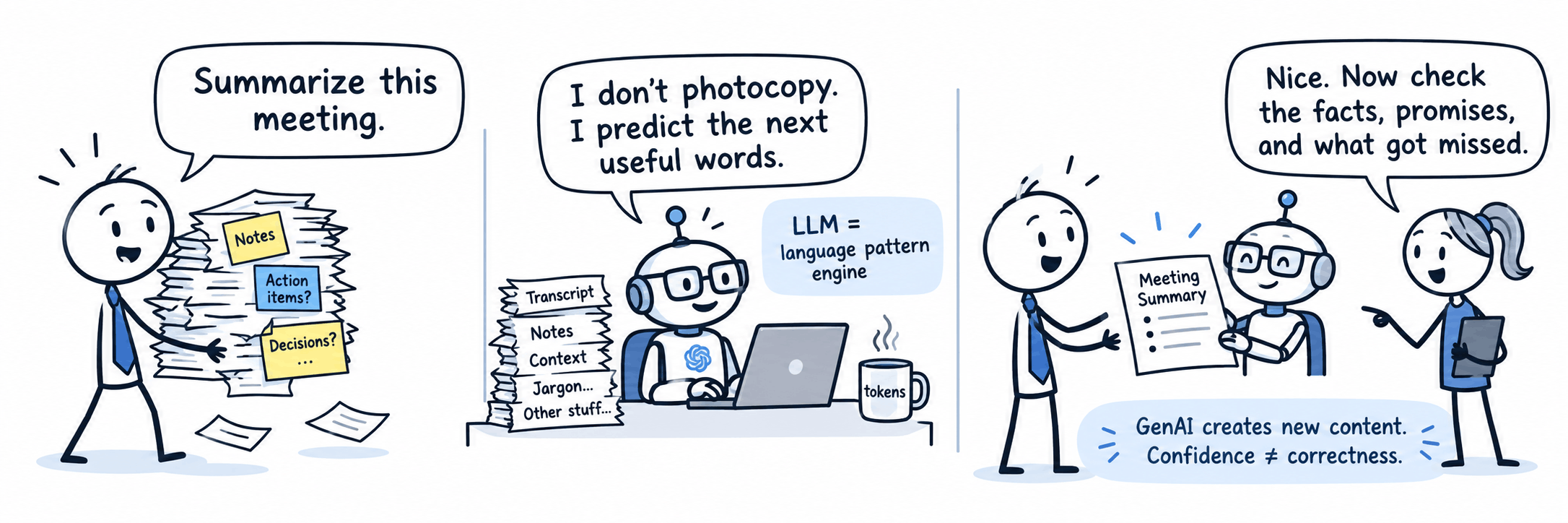
Generative AI produces new content; an LLM generates language from learned patterns and the context you supply.
Example
Ask for a meeting summary: the model drafts a new summary rather than simply copying the minutes.
Why it matters
A fluent sentence can still be wrong. Your job is to supply relevant material and check facts, commitments and missing information.
What happens when I ask generative AI for help?
Quick check: does a confident answer prove a claim is true? Explain why not.
Session 01 / Learn · try · check
9:15–9:35
What is NotebookLM?
An AI research assistant organised around notebooks and source materials.
What it does
Helps you ask questions across documents, summarise information and create reusable outputs.
Business value
Spend less time finding passages; spend more time checking meaning and deciding what to do. Measure time saved alongside corrections needed.
Example: combine meeting notes and a supplier proposal to prepare a source-backed manager briefing.
Session 01 / Learn · try · check
9:15–9:35
Grounding and RAG: bring evidence into the answer.
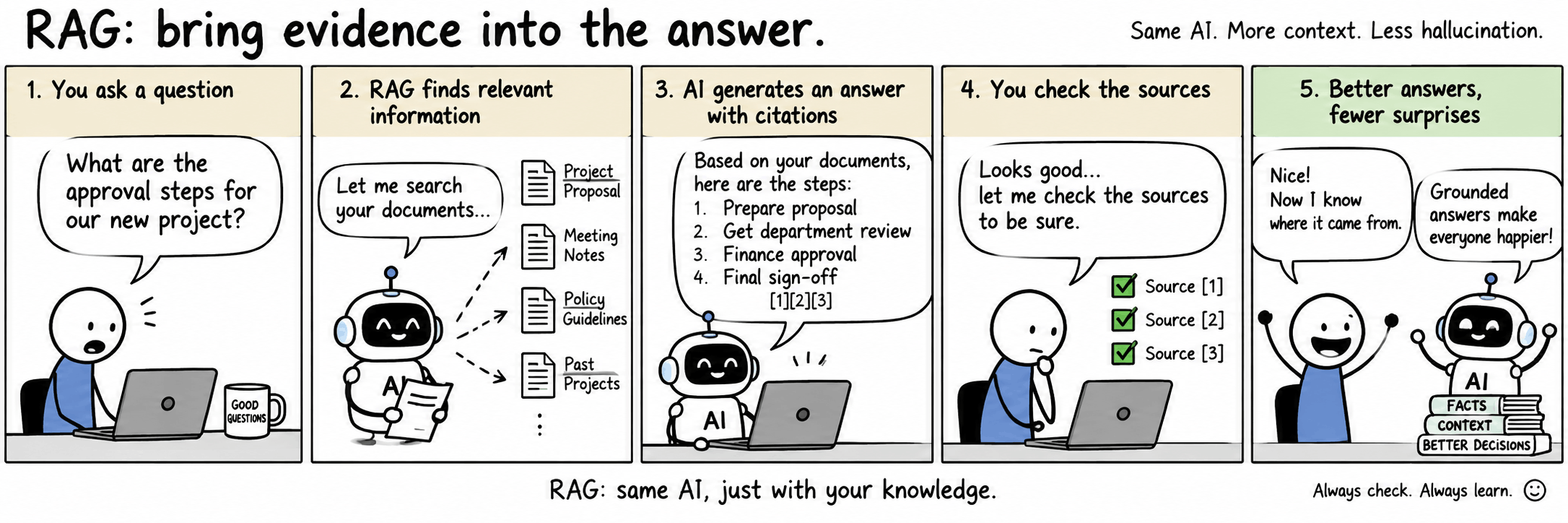
RAG means Retrieval-Augmented Generation: finding relevant material and using it as context for a generated answer.
Start with source documents, such as a proposal and meeting notes.
Relevant passages provide context for the question.
The model generates an answer; citations let you inspect the supporting material.
This is a conceptual explanation, not a diagram of NotebookLM’s undisclosed internal implementation. Grounding reduces unsupported answers but does not guarantee accuracy.
How does grounding help?
Session 01 / Learn · try · check
9:35–10:05
Create your first notebook.
Use the familiar event pack before the business case.
Locate Sources, Chat and Studio. Reopen your notebook from the notebook list.
Session 01 / Learn · try · check
9:35–10:05
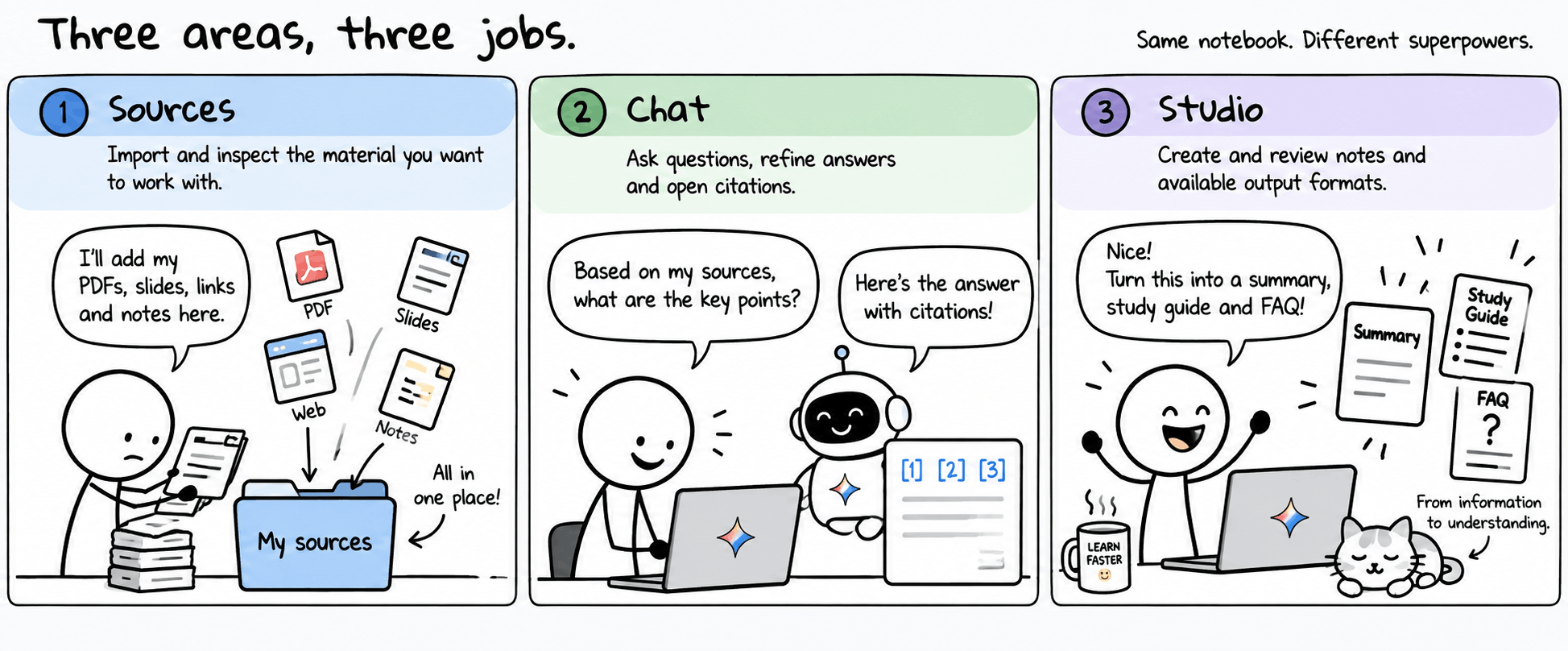
Three areas, three jobs.
Know where to go before trying advanced features.
Sources
Import and inspect the material you want to work with.
Chat
Ask questions, refine answers and open citations.
Studio
Create and review notes and available output formats.
Where do I start in a notebook?
Session 01 / Learn · try · check
9:35–10:05
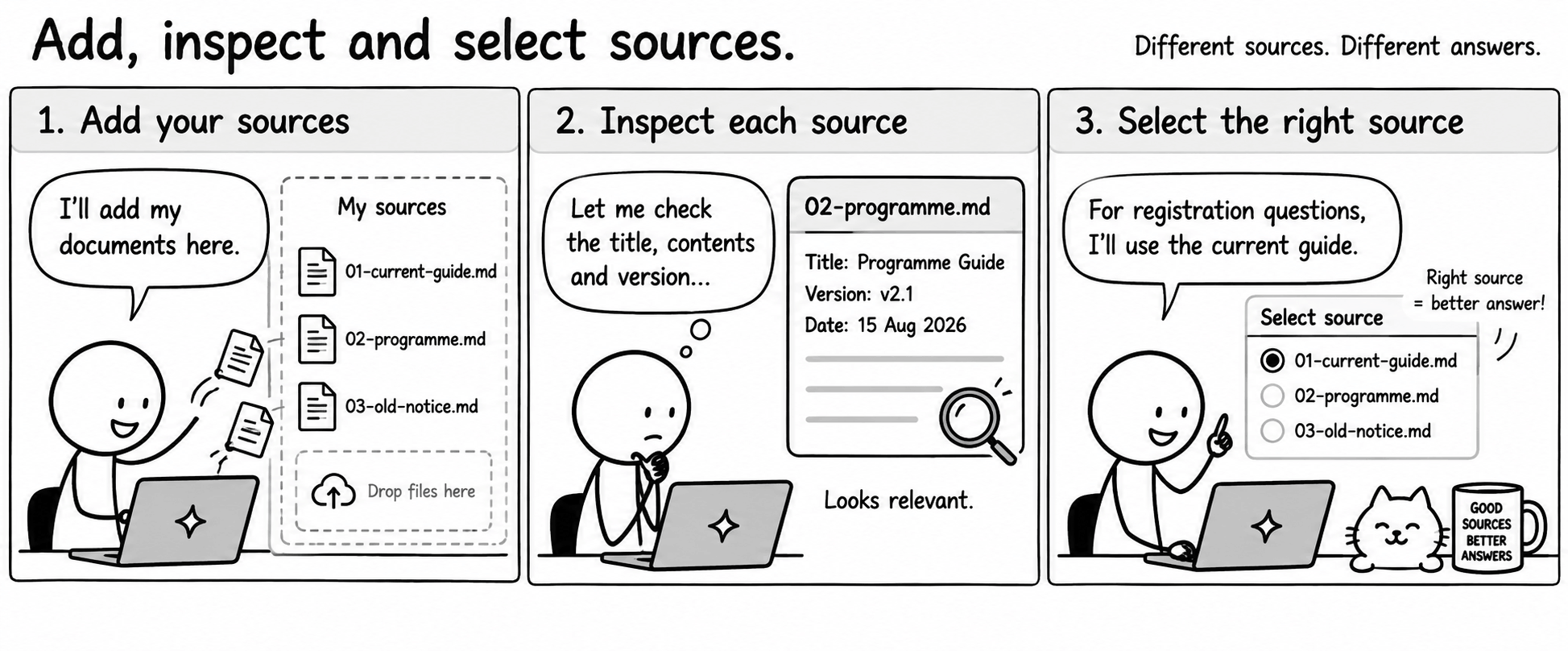
Add, inspect and select sources.
An imported source and an AI-generated answer are different things.
Add morning-starter/01-current-guide.md, 02-programme.md and 03-old-notice.md. If upload is unavailable, paste the text as a source.
Open each source and check its title, contents and version.
Select only the current guide and ask when registration opens. Repeat with only the old notice.
Record why 10:00 in Room B is current and 9:00 in Room A is superseded.
Why does source selection matter?
Session 01 / Learn · try · check
10:05–10:35
A useful prompt specifies the job.
Give a task, audience, source scope, output format and uncertainty instruction.
Try this prompt
Using only the current event guide and programme, write a three-bullet arrival briefing for a first-time attendee. Include time, room and what to bring. Cite each factual claim. If a detail is missing, say it is not documented.
Why this helps: the answer has a purpose and a checkable structure. Follow up with “Make it shorter without adding facts.”
Session 01 / Learn · try · check
10:05–10:35
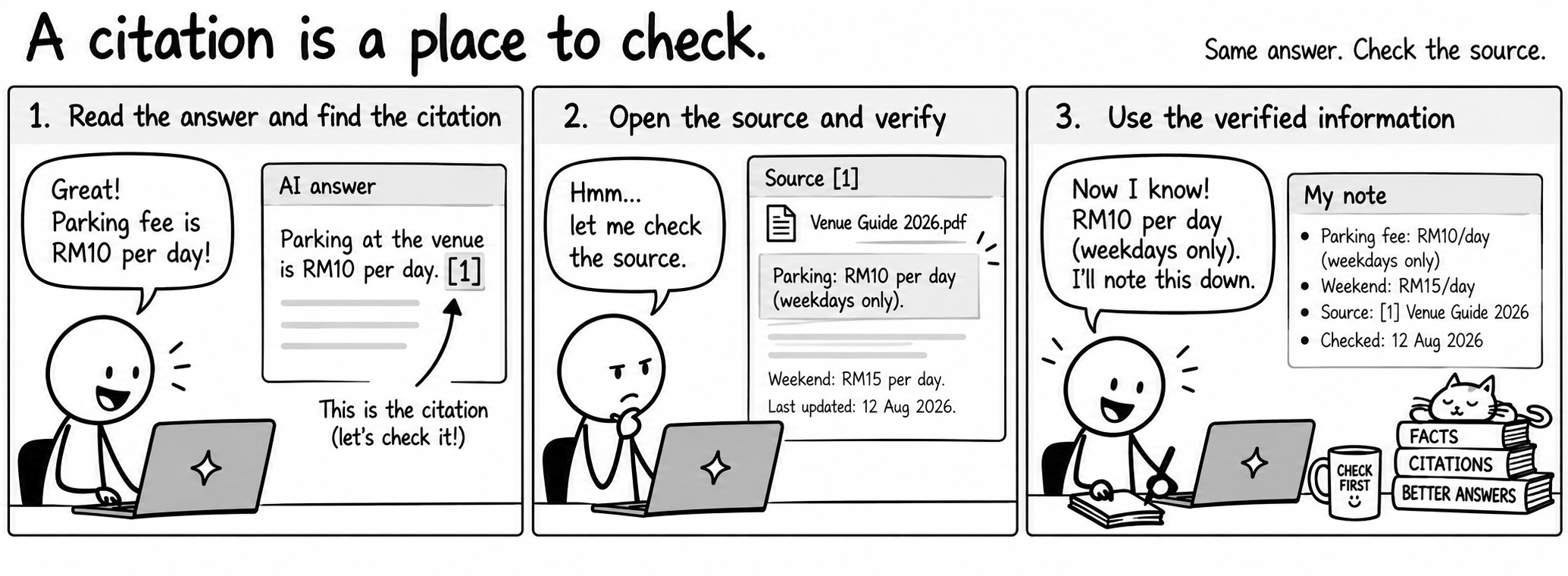
A citation is a place to check.
Verify the passage supports the exact claim, including conditions and dates.
Ask about registration, what to bring and parking fees.
Open citations and compare each answer to the original passage.
Record parking fees as not documented; do not fill the gap with a guess.
Save one corrected, verified response as a note.
How do I turn a response into something I can rely on?
Session 01 / Learn · try · check
10:05–10:35
Practice: produce a checked arrival briefing.
Work individually, then swap with a partner.
Write one prompt and improve it through a follow-up.
Verify three facts against the current documents.
Record one missing detail and save a note.
Partner check: can someone else trace your facts back to the sources?
Checkpoint: mark each operation independent, prompted or retry needed in day1-worksheet.md.
Session 01 / Learn · try · check
10:35–10:50
Take fifteen.
Return ready to use the same method on business documents.
Next: contracts, meeting summaries and market research.
Session 01 / Learn · try · check
10:50–11:10
One method, three business applications.
Use the fictional business-starter pack. Create a separate notebook named Learning Hub Business Brief.
Contract analysis
Extract deliverables, payment stages and exclusions from a draft supplier contract. Separate proposed terms from agreed decisions.
Meeting summaries
Separate decisions, actions, owners, deadlines and unresolved questions. Do not turn a suggestion into an approval.
Market research
Compare the supplied options using stated criteria. Label missing evidence; supplied fictional notes are not current market research.
Session 01 / Learn · try · check
10:50–11:10
Example: proposed does not mean approved.
The supplier draft proposes RM12,000. The meeting records a RM10,000 budget cap.
Try this prompt
Compare the draft contract and meeting notes. List proposed terms, recorded decisions and conflicts in a table with citations. Has purchase approval been recorded? Do not infer approval from a proposal.
Expected: a RM2,000 mismatch and no recorded purchase approval. Ask the owner to resolve it. Practice: identify the contract’s training inclusion and exclusion.
Session 01 / Learn · try · check
10:50–11:10
Example: turn minutes into an action list.
A helpful summary preserves accountability.
Try this prompt
From the meeting notes, produce a table: action, owner, deadline, status and citation. Separate decisions from proposals. Write “not assigned” when no owner is given.
Expected: Aina requests revised pricing by 18 September; Kumar checks access by 19 September. A proposed pilot date remains tentative. Practice: find one unresolved issue.
Session 01 / Learn · try · check
10:50–11:10
Example: compare options without inventing evidence.
A recommendation should show its assumptions.
Try this prompt
Compare the two options in the research notes for a manager. Use columns for cost, support, missing evidence and source. Keep source facts separate from your recommendation. What must we verify before choosing?
Expected: Option A costs more than the budget cap; Option B support response time is unspecified. Practice: suggest one follow-up research question.
Session 01 / Learn · try · check
11:10–11:20
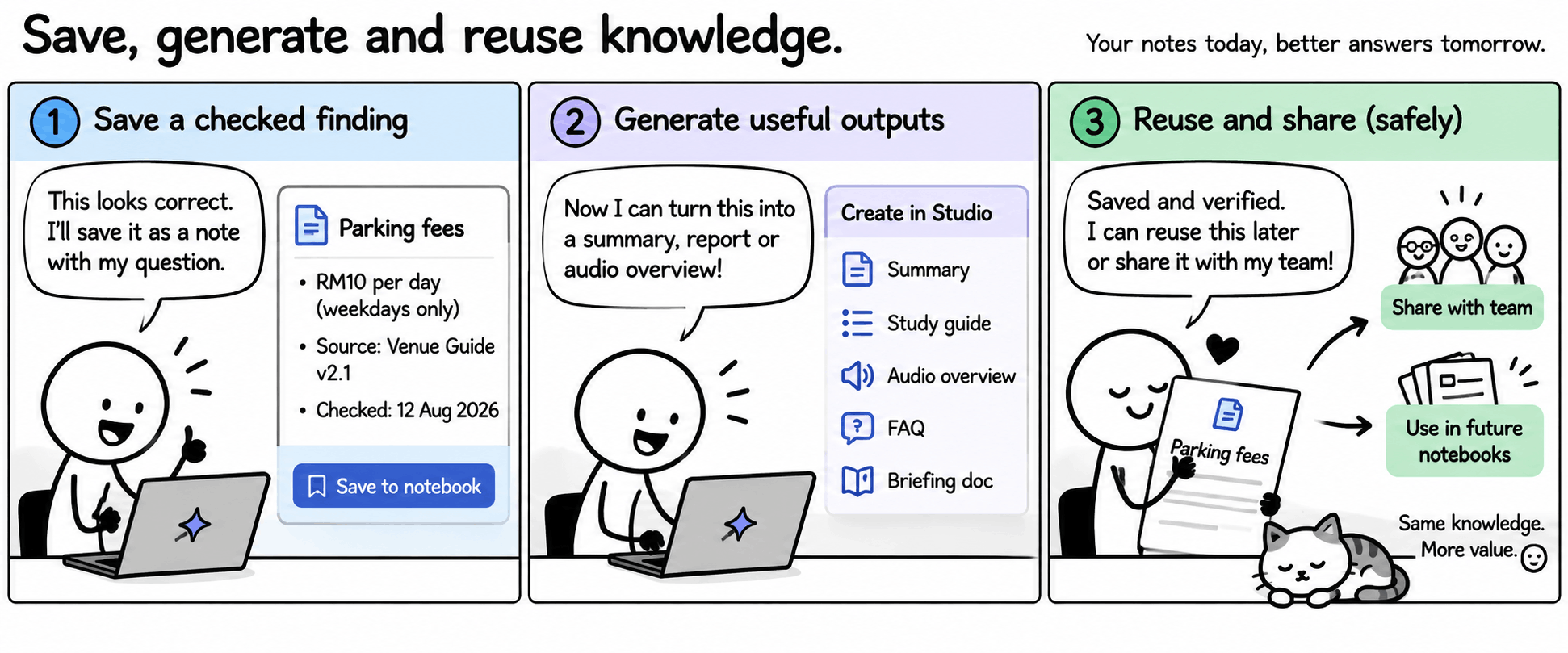
Save, generate and reuse knowledge.
An output is a draft to review, not a new authoritative source.
Save a checked answer as a note and add your own decision question.
Create one available Studio output, such as a report or audio overview. Review facts against sources. Use a written briefing if generation is unavailable.
Copy or export a verified item. Inspect sharing permissions without inviting anyone or making it public.
How do I reuse a finding I have already checked?
Use a notebook per topic, meaningful source names and version dates. Recheck imported content when source documents change.
Session 01 / Best practice
11:20–11:35
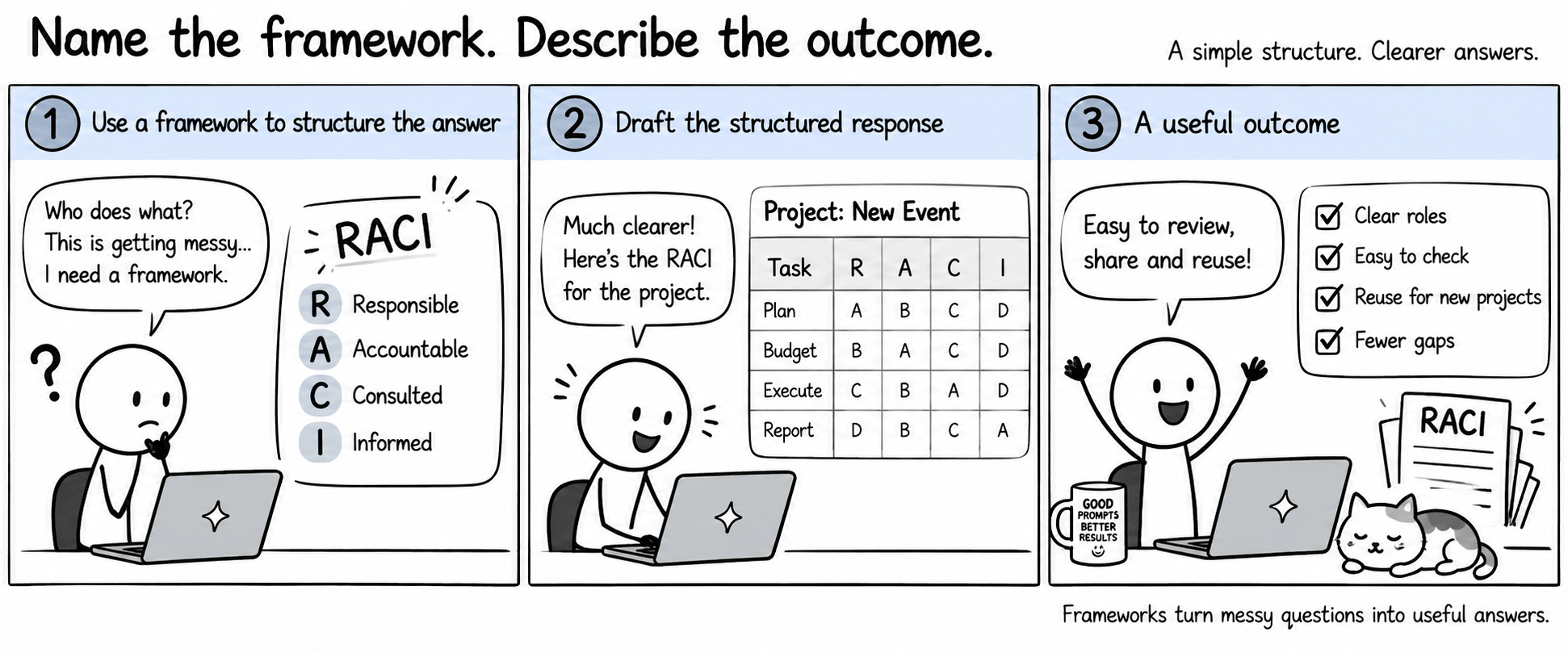
Name the framework. Describe the outcome.
Less explaining. A clearer starting structure. An output that is easier to review.
Shorter prompts
“Draft a RACI” names a familiar structure. You do not need to describe every column each time.
Describe the result
Say what you need: a responsibility table, a comparison, or a justified recommendation.
Easier to check and reuse
A consistent structure makes missing roles and evidence gaps easier to spot. Reuse the pattern with new sources.
Your question
Framework
Useful output
Who does what?
RACI
Responsibility matrix with evidence and gaps.
How deeply should we think or learn?
Revised Bloom’s taxonomy
Questions that move from recall to analysis, evaluation or creation.
Start short: source + framework or thinking task + outcome. Add detail only when the result needs it. Frameworks help structure an answer; they do not guarantee accuracy.
Why name a framework instead of writing a long prompt?
Session 01 / Best practice
11:20–11:35
RACI: clarify responsibility.
Make ownership and missing assignments visible.
Role
Meaning
Learning Hub example
R · Responsible
Does the work.
Aina requests revised pricing (BIZ-02).
A · Accountable
Owns the outcome or final sign-off.
Not documented in these notes.
C · Consulted
Provides input through discussion.
Not documented; confirm with the owner.
I · Informed
Receives progress or outcome updates.
Not documented; confirm recipients.
Aim for one accountable owner per activity in an agreed RACI. In a source-based draft, leave missing authority “not documented” rather than inventing an assignment.
RACI provides the structure; your prompt identifies the source and the required outcome.
Try this prompt
From BIZ-02, draft a RACI for the follow-up actions. Cite the roles and mark missing assignments “not documented”.
Expected: Aina is Responsible for pricing; Kumar for access. Migration responsibility and A/C/I roles are not established in this pack. Check the original passage before accepting a row.
Session 01 / Best practice
11:20–11:35
Bloom’s: ask for the thinking you need.
Select a useful level; every prompt does not need all six.
Level
Question using the business pack
Remember
What is the budget cap?
Understand
Explain the pricing conflict.
Apply
Use the cap to flag options needing revised pricing or approval.
Analyse
Compare costs, support and missing evidence.
Evaluate
Which next step is justified by the evidence and budget constraint?
Create
Draft a briefing separating findings, actions and recommendations.
Higher-level verbs do not guarantee better reasoning. Specify criteria and verify the result; a recommendation is not a recorded decision.
No need to name every Bloom’s level. “Analyse” or “evaluate” can express the thinking you want.
Try this prompt
Analyse BIZ-01–03 against the RM10,000 budget. Recommend the next step, citing facts and flagging gaps.
Run one RACI row or an Analyse/Evaluate prompt (3 minutes).
Open the source passage; check a role, number or assumption and correct one weakness (2 minutes).
Record the framework, why it fits and the check performed (2 minutes).
Keep it simple: name the sources, describe the outcome, then check the result. Add a short follow-up only where needed, such as “Separate confirmed roles from suggestions.” Open the prompt guide.
Session 01 / Learn · try · check
11:35–12:25
Project: Business Briefing Kit.
Help a manager decide what needs checking before a Learning Hub pilot.
Use business-starter/01–03; produce a short executive summary with three verified findings and citations.
Create an action list with owners and deadlines where documented. Use RACI to clarify roles, or a Bloom’s Analyse/Evaluate prompt to strengthen the briefing.
Record one open question or evidence gap. Separate your recommendation from the recorded facts.
Use materials/project-template.md. Name your framework, why it fits and one evidence check. Peer-check claims and revise before presenting.
Six teams of 3–5 cover 20–30 participants. Roles: curator, prompter, verifier and presenter; combine or share roles.
Session 01 / Learn · try · check
11:35–12:25
Build, check and rehearse.
Keep the output small enough for a busy manager.
Time
Activity
Evidence
11:35–11:45
Brief and source review
Agree the decision question
11:45–12:10
Create the kit
Summary, actions and one gap
12:10–12:20
Peer verification
Correct one weakness
12:20–12:25
Rehearse
Four-minute presentation
Session 01 / Learn · try · check
12:25–12:55
Show the evidence behind the briefing.
Four minutes to present; one minute of feedback per team.
Explain the business question and show your summary.
Open one citation and demonstrate what you verified.
Show the action list, open question and one correction.
Name your framework and explain how it improved the briefing or action list.
Assessment: correctness and evidence 35%; usefulness 30%; verification and limitations 20%; clear presentation 15%. Six teams × five minutes = 30 minutes.
Session 01 / Learn · try · check
12:55–1:00
What can you now do independently?
Complete the four exit questions and name your next real work task.
Explain GenAI/LLM and one limitation.
Explain how grounding and citation checking differ.
Show one prompt improvement and its effect.
Show a verified finding and the unresolved question in your kit.
Submit the kit and worksheet using the trainer’s agreed location. Include appropriate source access, never confidential real client documents.
Session 01 / Learn · try · check
Reference
Keep the working guides nearby.
Practice with safe sample data before using workplace material.